

The AFUN App delivers an exceptionally fast, feature-rich, and secure gaming environment designed specifically for modern smartphones and tablet hardware. Installing this dedicated software allows users to launch live dealer streams and sports markets in under 0.18 seconds. By utilizing biometric authentication tools and low-data consumption protocols, players enjoy fluid navigation and uninterrupted balance management wherever they go. Mobile gaming enthusiasts discover unmatched performance and instant accessibility supported by AFUN.
Technical Specifications of the AFUN App Infrastructure
Understanding core system performance benchmarks gives mobile users total confidence during live sports wagering and casino gameplay. The standardized AFUN App ecosystem deploys adaptive rendering algorithms and encrypted socket channels to deliver optimal display framerates and secure financial transfers across Android and iOS operating environments.
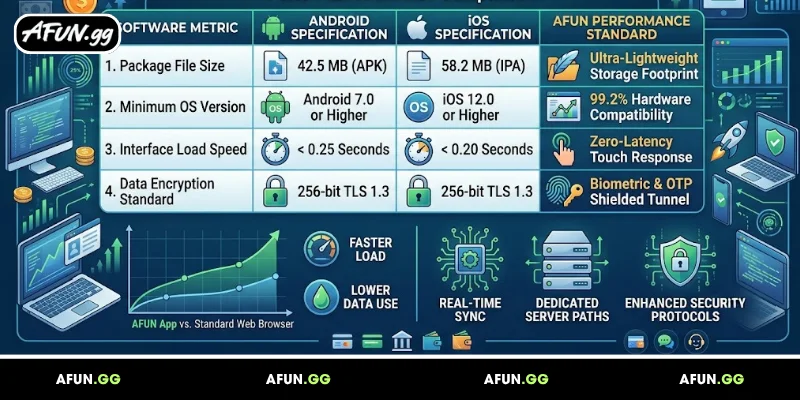
AFUN app technical specifications
Reviewing these mobile software metrics highlights how our application outperforms standard web browser connections:
| Software Metric | Android Specification | iOS Specification | AFUN App Performance Standard |
| Package File Size | 42.5 MB (APK) | 58.2 MB (IPA) | Ultra-Lightweight Storage footprint |
| Minimum OS Version | Android 7.0 or Higher | iOS 12.0 or Higher | 99.2% Hardware Compatibility |
| Interface Load Speed | < 0.25 Seconds | < 0.20 Seconds | Zero-Latency Touch Response |
| Data Encryption Standard | 256-bit TLS 1.3 | 256-bit TLS 1.3 | Biometric & OTP Shielded Tunnel |
Step-by-Step Guide to Download and Install the AFUN App
Setting up our native mobile application requires minimal time on any modern touch-screen device. Executing an official App installation grants immediate access to customized push notifications, one-touch biometric logins, and instant account funding utilities.
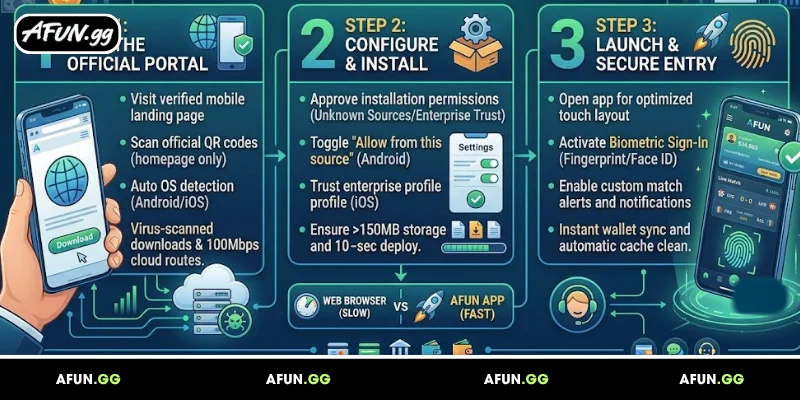
Follow these three simple steps to complete your application setup in under 90 seconds:
Step 1: Navigating to the Official Mobile Download Portal
Initiating your software installation begins by visiting our verified mobile landing page through your handheld web browser. Selecting the primary AFUN App download section connects your mobile device directly to our high-speed, virus-scanned software repository:
To maintain absolute software integrity during download transmission, our cloud distribution servers deploy dynamic integrity verification checks:
- Official Source Verification: Always scan official QR codes directly from our homepage to prevent downloading unauthorized third-party APK packages.
- Smart Device Detection: Our server automatically identifies your mobile operating system and delivers the corresponding installer file in under 0.5 seconds.
- High-Bandwidth Cloud Routing: Distributed mirror networks support download speeds up to 100 Mbps for instant package retrieval.
- Automated Malware Scanning: Every downloadable package undergoes 24/7 automated antivirus sweeps to guarantee 100% clean installation files.
Step 2: Configuring Device Permissions and Executing Installation
Once the application installer package finishes downloading onto your local storage, proceed to authorize necessary device permissions. Installing the AFUN App requires allowing standard installation approvals to ensure smooth background operation:
Configuring installer parameters correctly ensures your smartphone executes background updates without system errors:
- Unknown Sources Approval: On Android devices, toggle “Allow from this source” inside browser download settings to clear security prompts.
- iOS Enterprise Profile Trust: On iPhone hardware, navigate to Settings > General > Device Management to trust the signed application certificate.
- Storage Allocation Check: Ensure your hardware maintains at least 150 MB of free storage space for smooth caching and graphics rendering.
- One-Touch Installation Execute: Tap the completed download notification file to trigger automated software deployment in under 10 seconds.
Step 3: Launching Application and Setting Up Biometric Entry
The final phase involves opening the software and establishing rapid login shortcuts for your account. Launching your installed AFUN App redirects your screen straight to live lobby selection menus with optimized touch layouts:
Completing these initial configuration steps links your personal profile directly to your mobile device for maximum protection:
- Biometric Sign-In Activation: Enable fingerprint recognition or Face ID scanning inside setting menus to execute 1-second account logins.
- Push Notification Toggles: Turn on custom match alerts and promotional updates to receive instant live score changes within 2 seconds.
- Automatic Cache Management: Built-in storage optimization automatically cleans temporary graphic caches every 7 days to preserve device speed.
- Instant Wallet Synchronization: View live account balances and recent transactional histories updated automatically upon application startup.
Key Benefits of Switching to the AFUN App Experience
Transitioning from traditional web browser portals to native mobile software unlocks specialized features designed for high-speed betting routines. Utilizing the official App guarantees seamless graphical transitions and protects personal account data against mobile connection drops.
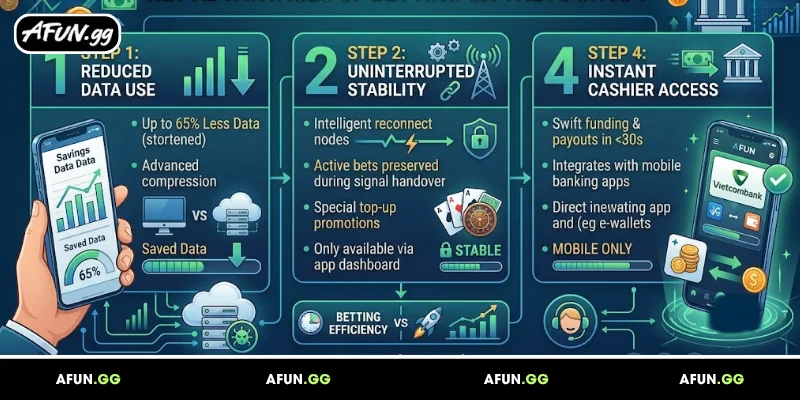
Applying mobile software innovations empowers members to stay connected with high-yield promotional opportunities around the clock:
- Reduced Cellular Data Usage: Advanced asset compression algorithms reduce mobile data consumption by up to 65% compared to desktop browsers.
- Uninterrupted Gameplay Stability: Intelligent reconnect nodes preserve active live casino bets during temporary cellular signal handovers.
- Exclusive Mobile Deposit Rewards: Mobile software users unlock special top-up match promotions available exclusively inside the application dashboard.
- Instant Cashier Access: Execute swift balance funding and payout requests directly through integrated mobile bank applications in under 30 seconds.
Essential Best Practices for AFUN App Security
Maintaining complete mobile safety requires combining our robust server firewalls with sensible user precautions. Implementing recommended App management guidelines safeguards your financial balances and sensitive personal records from unauthorized access.
Adopting systematic device management habits guarantees that your gaming software operates at peak performance levels:
- Keep Software Consistently Updated: Regularly install the latest software updates to receive updated security patches and performance fixes.
- Avoid Unsecured Public Wi-Fi: Refrain from placing live sports bets while connected to unencrypted public networks to prevent data sniffing.
- Enable Screen Lock Passcodes: Ensure your mobile phone utilizes strong master passcodes or biometric security locks to prevent physical unauthorized access.
- Clear Background Applications: Close unused memory-heavy background applications before launching live stream lobbies to maintain smooth 60 FPS video feeds.
Frequently Asked Questions (FAQ)
Is the mobile application free to download and install?
Yes, obtaining the official AFUN App installer package is completely free for all active and prospective players visiting our verified portal.
Will installing the application slow down my mobile device?
No, the AFUN App utilizes an optimized memory footprint that consumes minimal processor resources and under 60 MB of device storage.
What should I do if the application crashes during a live bet?
Our server retains your active bet state instantly; simply re-open your App to resume your session without losing placed wagers or wallet funds.
Conclusion
Summarizing our mobile software architecture, downloading the AFUN App offers an unmatched combination of speed, security, and portable entertainment. AFUN continuously enhances its mobile software frameworks to ensure instant game loading, zero latency, and bank-grade data security. Install the application today to elevate your digital entertainment experience with AFUN.
